Version Tracking Options
The actions taken when accepting match or applying its markup are defined as options, which
can be changed by the user. The sections below describe the various options available
and list the default values. To access the options you can click the
 icon on the
Matches Table.
icon on the
Matches Table.
Accept Match Options
Below is a image of the Accept Match Options:
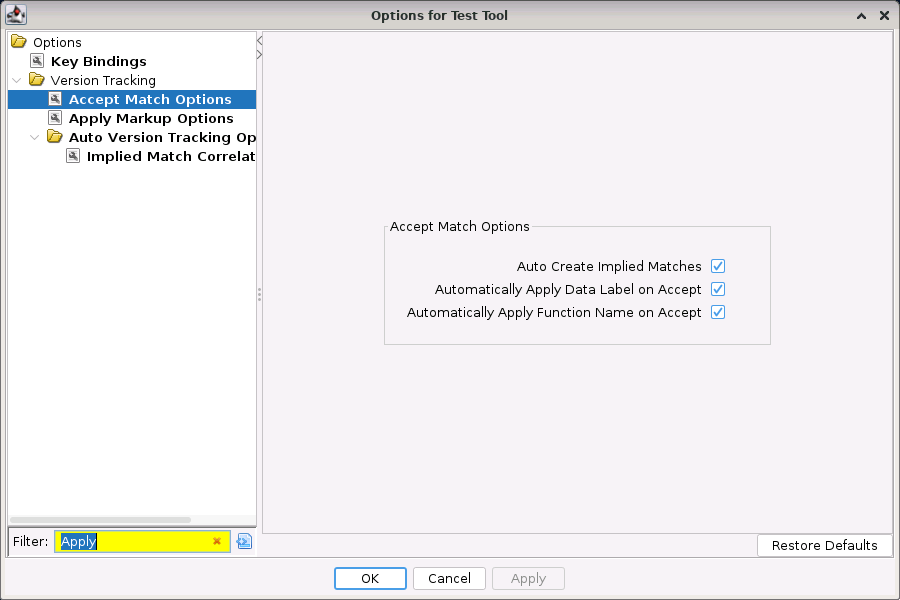
The following items will happen when a match is accepted:
| Name | Description | Default Value |
|---|---|---|
| Auto Create Implied Matches | When true, an implied match will be created. | True |
| Automatically Apply Function Name on Accept | When true, the function name of the function in the source program will be applied to the matched function in the destination program. | True |
Apply Markup Options
Below is a image of the Apply Markup Options:
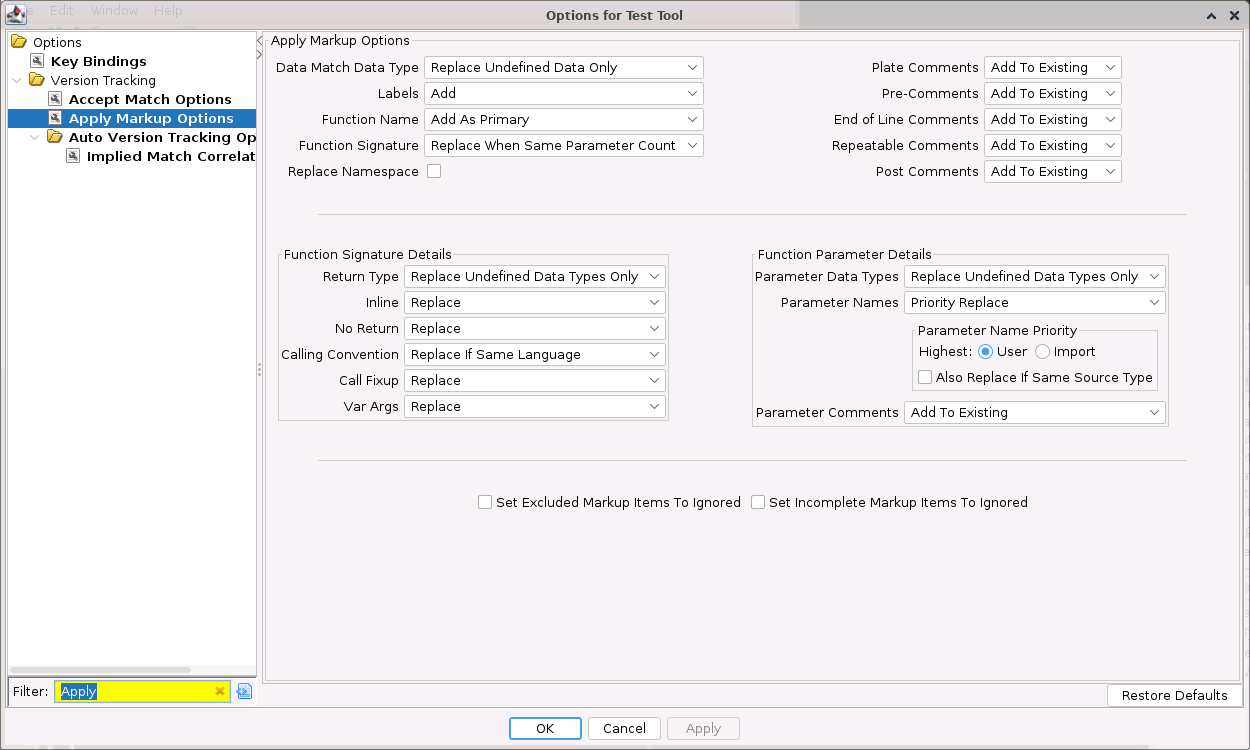
The table below contains the markup items and their default actions taken when Apply Markup is executed on a match. Each type of markup has different available actions. These are:
- Data Match Data Type Markup:
- Do Not Apply - Do not apply markup to the destination program.
- Replace First Data Only - Replace the markup in the destination with that from the source program. The replace will fail if any instructions or defined data, other than a defined data at the destination address, would be overwritten by the replace.
- Replace All Data - Replace the markup in the destination with that from the source program. The replace will fail if any instructions would be overwritten by the replace. Important: After doing Replace All Data, the Reset Mark-up action will only be able to restore the single Data item that was originally at the Destination Address. Any other Data items that were replaced by this action will not be restored by Reset Mark-up.
- Replace Undefined Data Only - Only replace undefined bytes in the destination with the markup item's data type in the source program. Otherwise, do nothing.
- Label Markup:
- Do Not Apply - Do not apply markup to the destination program
- Add - Adds the labels from the source program to those already at the address in the destination program.
- Add As Primary - Adds the labels from the source program to those already at the address in the destination program. Sets the primary label in the destination program to whatever label was the primary one in the source program.
- Replace All - Replaces all the labels at the address in the destination program with those from the source program.
- Replace Default Only - Only apply labels from the source program to the destination program when the label in the destination program is a default label.
- Function Name Markup:
- Do Not Apply - Do not apply markup to the destination program
- Add - Adds the function name from the source program to the one already at the address in the destination program. If the existing primary symbol is default, then no new label will not be added, but instead the existing label will be replaced with the source name.
- Add As Primary - Adds the function name from the source program to the one already at the address in the destination program. Sets the primary label in the destination program to whatever label was the primary one in the source program.
- Replace Always - Always use the source symbol name to replace the destination symbol name. The one exception is that if the source symbol is a default symbol, then the destination symbol name will be removed instead of being replaced with the source symbol name.
- Replace Default Only - Only apply markup from the source program to the destination program when the label in the destination program is a default label.
- Function Signature Markup: Applying function signature markup applies the function signature except for the names, which are controlled by the parameter names markup.
- Do Not Apply - Do not apply markup to the destination program.
- Replace - Always replace the markup in the destination with that from the source program.
- Replace When Same Parameter Count - Only replace the function signature in the destination with that from the source program when the number of parameters in the source signature match the number of parameters in the destination signature.
- Comment Markup:
- Do Not Apply - Do not apply markup to the destination program.
- Add To Existing - Append the markup from the source program to the destination program.
- Replace Existing - Replace the markup in the destination program with the markup from the source program.
| Name & Description | Default Value |
|---|---|
| Calling Convention : Specifies the default action to take for applying the function's calling convention when applying the function signature markup of a match. | Replace If Same Language |
| Call Fixup : Specifies the default action to take for applying the function's call fixup when applying the function signature markup of a match. | Replace |
| Data Match Data Type : Specifies the default action to take when applying the data type markup of a data match. | Replace Undefined Data Only |
| End of Line Comment : Specifies the default action to take when applying EOL comment markup of a match. | Add To Existing |
| Function Name : Specifies the default action to take when applying the function name of a match. | Add As Primary |
| Function Signature : Specifies the default action to take when applying the function signature of a match. | Replace When Same Parameter Count |
| Replace Namespace : Specifies whether to apply the source function's namespace when applying the function name. Note: If the source uses the Global namespace, then the destination will not be updated when this option is on. The Global namespace is considered the default namesapce. The assumption is that if the destination program has a non-Global namespace, then the existing destination namespace is preferred over the Global namespace. | True |
| Inline : Specifies the action to take for applying the inline flag when applying a function signature markup of a match. | Replace |
| No Return : Specifies the default action to take when applying the no return flag when applying a function signature markup of a match. | Replace |
| Parameter Comments : Specifies the default action to take when applying the parameter comments when applying a function signature markup of a match. | Add To Existing |
| Parameter Data Types : Specifies the default action to take when applying the parameter data types when applying a function signature markup of a match. | Replace Undefined Data Types Only |
| Parameter Names : Specifies the default action to take when applying the parameter names when applying a function signature markup of a match. | Priority Replace |
| Parameter Names Highest Name Priority : Specifies the highest to lowest priority order of the source types that are used when performing a Priority Replace for Function Parameter Names. | User |
| Parameter Names Replace If Same Priority : When true, if Function Signatures are being replaced and Function Parameter Names are doing a User Priority Replace or an Import Priority Replace and the Source Types are the same for the source and destination parameters, the source parameter will replace the destination parameter. | False |
| Labels : Specifies the default action to take when applying the label of a match. | Add |
| Plate Comment : Specifies the default action to take when applying Plate Comment markup of a match. | Add To Existing |
| Post Comment : Specifies the default action to take when applying Post Comment markup of a match. | Add To Existing |
| Pre Comment : Specifies the default action to take when applying Pre Comment markup of a match. | Add To Existing |
| Repeatable Comment : Specifies the default action to take when applying Repeatable Comment markup of a match. | Add To Existing |
| Return Type : Specifies the action to take for applying the return type when applying a function signature markup of a match. | Replace Undefined Data Types Only |
| Set Excluded Markup Items To Ignored : When true, any markup items marked as Do Not Apply via these options will have their status marked as ignored, with a status ofDon't Care . | False |
| Set Incomplete Markup Items To Ignored : When true, any markup item that could not be applied (such as when it has no destination address set) will have their status marked as ignored, with a status ofDon't Care . | False |
| Var Args : Specifies the action to take for applying the var args flag when applying a function signature markup of a match. | Replace |
Provided by: Version Tracking Plugin
Related Topics: