About Program
The About Program dialog displays summary information about a program.
To view information about the currently open (active) program
- From the menu-bar of the tool that has the program open, select Help → About Program ...
To view information about any program in the project window
- Right click on the program and select About... from the popup menu.
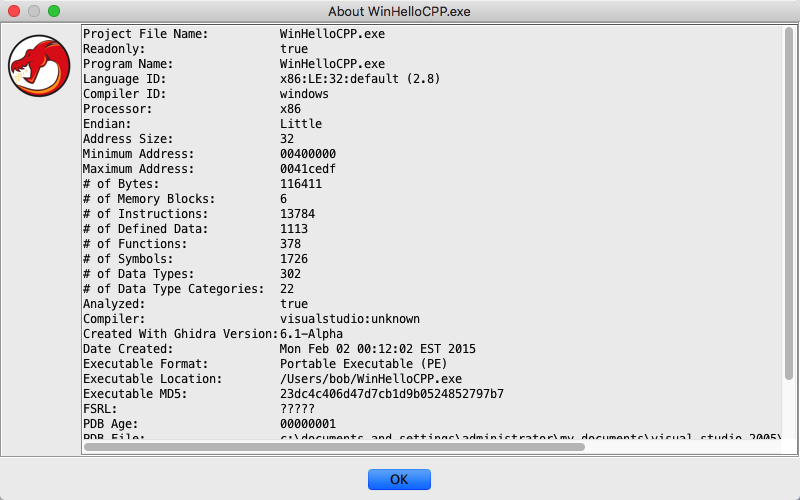
Figure 1 - About Program
Notes: When viewing the "About" information on a non-open program, you may get a very abbreviated version of the program's information if the program was created with a version of Ghidra before version 4.2. Once a program has been saved with version 4.2 or later, the full "About" information will be available.
Standard information displayed in the "About Program" dialog
| Project File Name | name of the ghidra program file |
|---|---|
| Last Modified | date the program was last modified |
| Read-only | whether the program is marked as read-only |
| Currently Modified | whether the program has been changed |
| Program Name | name of the program |
| Language Provider | name of processor language used to disassemble this program |
| Processor | name of the program's target processor |
| Manufacturer | name of manufacturer of the program's target processor |
| Endian | either "big" or "little" |
| Address Size | size, in bits, of the program's address space |
| Start Address | minimum address of the program |
| Ending Address | maximum address of the program |
| # of Memory Blocks | total number of memory blocks in the program |
| # of Instructions | total number of disassembled instructions in the program |
| # of Defined Data | total number of defined data in the program |
| # of Symbols | total number of symbols defined in the program |
Below the standard information, the program properties will be displayed. The information displayed here will vary from program to program.
To close this dialog
- Click the OK button.
Provided by: About Program plugin
Related Topics: