Home > DebuggerStackPlugin > Stack
Debugger: Stack
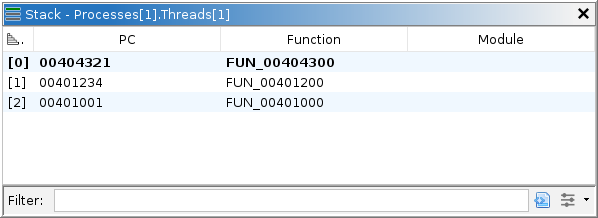
The stack window displays the current trace's execution stack, as unwound and reported by the target. Not all debuggers will unwind the stack, in which case, this window displays only the innermost frame. When emulation is used to generate the current machine state, only a single synthetic frame is shown. See the Unwind Stack action for an alternative mechanism that unwinds using Ghidra's program databases and works during emulation. Level 0 always refers to the innermost frame, and each incremental level refers to the next caller in the chain — most of the time. The current frame comprises one element of the tool's current coordinates. Double-clicking a frame activates new coordinates, potentially causing other windows to display different information. Namely, the Registers window will show registers for the current frame, assuming they can be retrieved. The Listings may also navigate to the current frame's program counter.
Table Columns
The stack table has the following columns:
- Level - the level of the frame, counting 0-up starting at the innermost frame.
- PC - the address of the instruction to execute next, or upon return of the callee for non-0 frames. Different debuggers may have different subtleties in how they report PC.
- Function - the name of the function containing the PC, if Ghidra has the corresponding module image imported, analyzed, and mapped.
- Module - the name of the module containing the PC.
Action
The stack plugin provides a single action:
Unwind Stack (U)
This action is in the main menu: Debugger → Analysis → Unwind from frame 0. It attempts to unwind the current thread's stack segment, creating frame data units in the listing. It starts by reading the program counter and stack pointer from the innermost frame of the current thread. It then maps the program counter to the program database and analyzes the function containing it. If successful, it can determine the frame's base address then locate variables, saved registers, and the return address. Knowing the return address and frame depth, it can derive the program counter and stack pointer of the next frame and unwind it in the same manner. This proceeds until analysis fails or the stack segment is exhausted. For best results, ensure you have imported and opened the Ghidra program database for every module, or at least the subset you expect to see in your stack. To view the results, navigate to or follow the stack pointer in a Dynamic Listing. The Stack window does not display Ghidra's unwinding results.
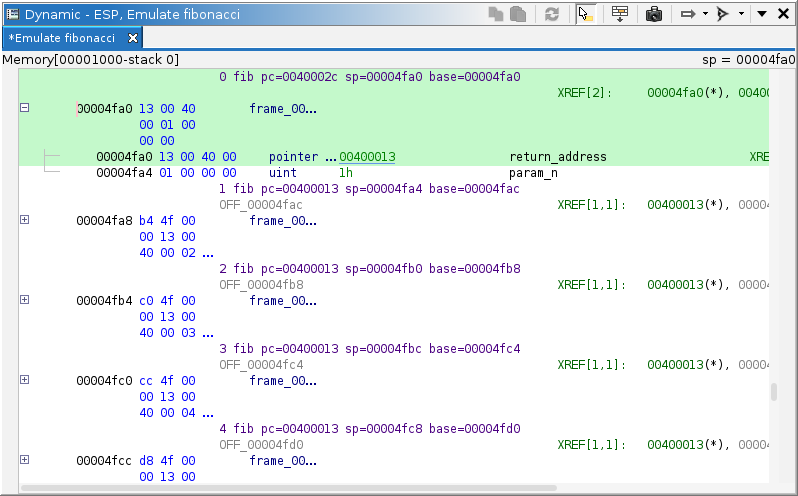
Each call record generates a structure data unit derived from the function's frame. The exact contents of the structure depend on the current program counter within that function. Only those entries actually allocated at the program counter are included. Each field in that structure can be one of five kinds:
- Local stack variable: These are named with the
local_prefix. They correspond exactly to those entries found in the function's stack frame in the program database. - Stack parameter: These are named with the
param_prefix. They correspond exactly to those entries found in the function's stack frame in the program database. - Return address: This is named
return_address. It is determined by interpreting the function's machine code. - Saved register: These are named with the
saved_prefix. They are determined by interpreting the function's machine code. - Slack space: These are named with the
offset_prefix (orposOff_for positive offsets). They represent unused or unknown entries.
The frame entries are not automatically updated when a function's frame changes in a program database. To update the unwind after changing a function's stack frame, you must unwind again.