Home > FrontEndPlugin > Restore Project
Restore Project
The Restore Project operation will create a new project from an Archived project file. Restoring a project makes it the active project.
Note: You must close your project before you can restore an archived project.
To restore an archived project,
- If a project is open, close it by selecting File → Close Project from the Ghidra Project Window menu.
- Select File → Restore Project....
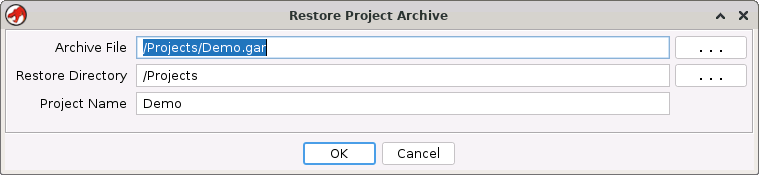
- The Restore Project Archive dialog is displayed. Fill in the fields to indicate the project to restore and where to restore it.
-
- Archive File: Specify the full path for the archive file to be restored. Use the browse button (". . .") to locate the archive (*.gar) file.
- The Restore Directory and Project Name fields are automatically filled in when you use the browse button (". . .") to the right of the Archive File field to select the archive file.
- Restore Directory: The project directory where the new project will be created.
-
Project Name: The name of the new project.
-
Press the OK button.
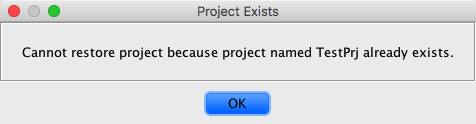
- If the project is being restored to the same name and location as an existing
project, the Project Exists dialog is displayed, as shown below.
-
Specify a different Restore Directory or a Project Name that doesn't exist and try again.
-
The 'In Progress' dialog is displayed indicating the archive is restoring. When the restore is complete, this dialog will disappear and the newly restored project appears in the Ghidra Project Window.
- To cancel the restore operation click on the Cancel button. Any files that were created during the restore are removed as a result of the cancellation.
Restoring a Version 2.x Project
If you restore a project from a version of Ghidra that was 2.x or before, and the project contained multiple users, the project is restored with you as the owner of all the files. You will see the folders and data files for the other users that were in the project, but you are the owner.
Provided by: ArchivePlugin
Related Topics:
← Previous: Archive Current Project | Next: Project Repository →