External Program Names
An external reference is a reference to a location in another program. The reference destination includes the name of some program. To use an external reference to navigate, the external program name must be associated with an existing program file in the Ghidra project. If the association has been defined, then the external reference is said to have been *resolved*. The External Programs view manages the associations between external program names and program files. The table shows all external program names and their associated links to program files. Use the External Programs view to add external names, delete external names, set associations, and clear associations.
External Programs View
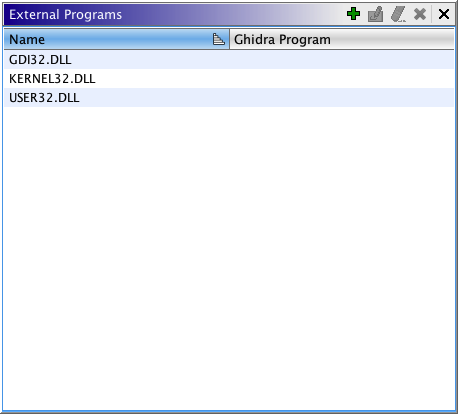
The External Programs view consists of a main scrollable list of external program names and their associated Ghidra program files.
Name Column
The name of the external program. Many external programs will share the same external
program name. Setting or changing the associated Ghidra file will affect all the external
references to that name. Double-click on this field to edit the name. After you change
the name, hit the <Enter> key.
Ghidra Program Column
The Ghidra file associated with the external program name. This field is blank if external reference has not been resolved. Ghidra will not be able to "follow" an external reference if its external program name does not have an associated Ghidra file.
Add Button
The Add  button will bring up a text dialog
for entering a new external program name.
button will bring up a text dialog
for entering a new external program name.
Set External Name Association Button
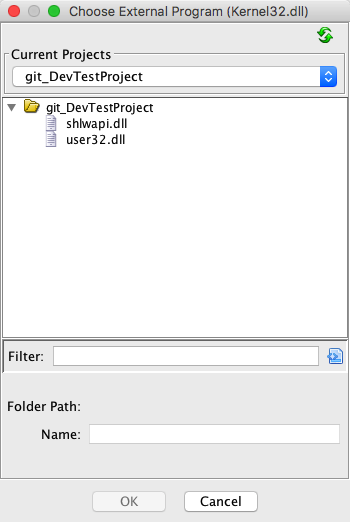
The Set  button brings up a Ghidra program chooser dialog. Choose a
Ghidra program file to associate it with the selected external program name. This button
is only enabled when a single external program name is selected.
button brings up a Ghidra program chooser dialog. Choose a
Ghidra program file to associate it with the selected external program name. This button
is only enabled when a single external program name is selected.
Clear External Name Association Button
This Clear  button clears the assocated program for all the
selected external program names.
button clears the assocated program for all the
selected external program names.
Delete External Name Button
This Delete button deletes the selected external program names from the
program. If a selected external program name contains external locations, it can
not be deleted. The Delete button is enabled
whenever one or more external program names are selected.
Working with External Program Names
Adding a New External Program Name
- Select Window → External Programs from the main Code Browser menu.
- Press the Add button.
- Enter the new external program name into the pop-up dialog.
- <>
If the table is sorted by Name, then the name you enter will be placed at the correct position in the table to maintain the sort order. The sort icon
 or
or  indicates the order and what column is being sorted. You can also sort by Ghidra Pathname by clicking on the header for this column. Click on the sort icon to change the order.
</>
indicates the order and what column is being sorted. You can also sort by Ghidra Pathname by clicking on the header for this column. Click on the sort icon to change the order.
</>
Resolving an External Name to an existing Ghidra program
- Select Window→ External Programs from the main Code Browser menu.
- Click on the external program name that is be associated with a Ghidra program file.
- Press the Edit button.
- Use the Ghidra Program Chooser dialog to select the Ghidra file to associate to the selected program name.
- The Code Browser updates to indicate that the external reference has been resolved. (Unresolved references are shown in red.)
Clearing a Resolved External Program Name
- Select Window→ External Programs from the main Code Browser menu.
- Click on the external program name that has an association to be cleared.
- Press the Clear
 button
Removing an External Program Name
- Select Window→ External Programs from the main Code Browser menu.
- Click on the external program name to be removed.
- Press the Delete button.
- If external references still exist, a dialog is displayed indicating that the external program name cannot be deleted. All external references to that external program name must be deleted before it can be deleted.
Provided by: References Plugin
Related Topics: